


[Series] Xây dựng RESTful API từ con số 0 với PHP Thuần & MVC - Phần 1: Khởi tạo và Logic Đăng ký
Chào các bạn, mình là một Backend Developer. Trong thế giới của những Framework mạnh mẽ như Laravel, Symfony hay Slim, đôi khi chúng ta quên mất những gì diễn ra "dưới nắp ca-pô".
Hôm nay, mình bắt đầu Series "Xây dựng RESTful API siêu tối giản" để cùng các bạn ôn lại kiến thức nền tảng về kiến trúc MVC và cách tổ chức code PHP thuần sao cho khoa học nhất. Phần 1 này, chúng ta sẽ tập trung vào việc dựng khung dự án và hoàn thiện tính năng Đăng ký (Register)
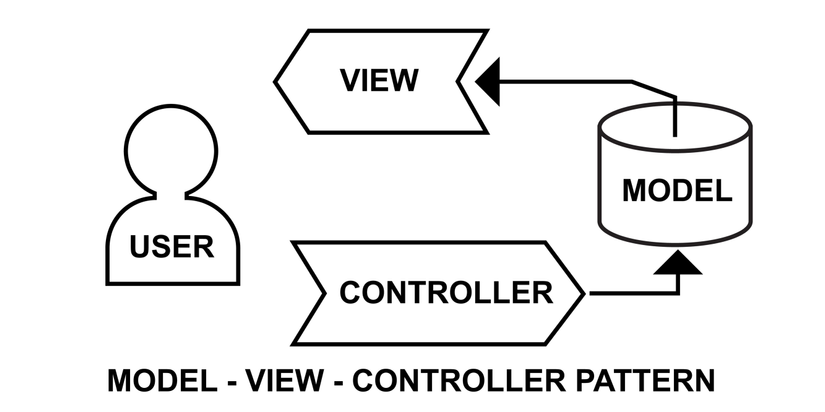
1. Cấu trúc thư mục (Project Structure)
Một cấu trúc rõ ràng là chìa khóa để bảo trì dự án. Chúng ta sẽ đi theo mô hình MVC (Model-View-Controller), nhưng vì là API nên phần "View" sẽ được thay thế bằng các phản hồi JSON.
project/
│
├── app/
│   ├── Controllers/    # Xử lý logic nghiệp vụ
│   ├── Models/         # Tương tác với Cơ sở dữ liệu
│   └── Core/           # Các lớp cốt lõi (Database, Response,...)
│
├── public/
│   └── index.php       # Front Controller (Điểm vào duy nhất)
│
├── .htaccess           # Rewrite URL (Cho Apache)
└── vendor/             # Autoload từ Composer
2. Lớp cốt lõi (Core Components)
2.1. Kết nối Cơ sở dữ liệu (Database.php)
Chúng ta sử dụng Pattern Singleton để đảm bảo chỉ có duy nhất một kết nối PDO được tạo ra trong suốt vòng đời của request.
File: app/Core/Database.php
<?php
namespace App\Core;

use PDO;
use PDOException;

class Database {
    private static $instance = null;
    private $pdo;

    private function __construct() {
        // Thay thông số phù hợp với DB của bạn
        $host = 'localhost';
        $db   = 'your_database';
        $user = 'your_username';
        $pass = 'your_password';
        $charset = 'utf8mb4';

        $dsn = "mysql:host=$host;dbname=$db;charset=$charset";
        $options = [
            PDO::ATTR_ERRMODE            => PDO::ERRMODE_EXCEPTION,
            PDO::ATTR_DEFAULT_FETCH_MODE => PDO::FETCH_ASSOC,
        ];

        try {
            $this->pdo = new PDO($dsn, $user, $pass, $options);
        } catch (PDOException $e) {
            header('Content-Type: application/json');
            die(json_encode(['error' => 'Database connection failed: ' . $e->getMessage()]));
        }
    }

    public static function getInstance() {
        if (!self::$instance) {
            self::$instance = new Database();
        }
        return self::$instance->pdo;
    }
}
2.2. Chuẩn hóa phản hồi (Response.php)
Lớp này giúp chúng ta trả về dữ liệu JSON một cách đồng nhất và chuyên nghiệp.
File: app/Core/Response.php
<?php
namespace App\Core;

class Response {
    public static function json($data, $status = 200) {
        http_response_code($status);
        header('Content-Type: application/json');
        echo json_encode($data);
        exit;
    }
}
3. Tầng dữ liệu và Logic (Model & Controller)
3.1. Model Người dùng (User.php)
Model sẽ chịu trách nhiệm thực thi các câu lệnh SQL.
File: app/Models/User.php
<?php
namespace App\Models;

use App\Core\Database;
use PDO;

class User {
    protected $db;

    public function __construct() {
        $this->db = Database::getInstance();
    }

    public function findByEmail($email) {
        $stmt = $this->db->prepare("SELECT * FROM Users WHERE email = ?");
        $stmt->execute([$email]);
        return $stmt->fetch();
    }

    public function create($data) {
        $stmt = $this->db->prepare("
            INSERT INTO Users (name, email, password, phone_number, address, status, created_at)
            VALUES (?, ?, ?, ?, ?, 'active', NOW())
        ");
        $stmt->execute([
            $data['name'],
            $data['email'],
            $data['password'],
            $data['phone_number'],
            $data['address']
        ]);
        return $this->db->lastInsertId();
    }
}
3.2. Controller xác thực (AuthController.php) Đây là nơi "nhào nặn" dữ liệu: Validate đầu vào, mã hóa mật khẩu và gọi Model.
File: app/Controllers/AuthController.php
<?php
namespace App\Controllers;

use App\Models\User;
use App\Core\Response;

class AuthController {
    public function register() {
        // Lấy dữ liệu từ raw body (JSON)
        $input = json_decode(file_get_contents("php://input"), true);

        // 1. Validation cơ bản
        $required = ['name', 'email', 'password', 'phone_number', 'address'];
        $missing = array_filter($required, fn($field) => empty($input[$field]));

        if (!empty($missing)) {
            Response::json([
                'error' => 'Missing required fields',
                'fields' => array_values($missing)
            ], 422);
        }

        $userModel = new User();

        // 2. Kiểm tra email tồn tại
        if ($userModel->findByEmail($input['email'])) {
            Response::json(['error' => 'Email already exists'], 422);
        }

        // 3. Hash mật khẩu & Lưu trữ
        $input['password'] = password_hash($input['password'], PASSWORD_DEFAULT);
        $userId = $userModel->create($input);

        Response::json([
            'message' => 'User registered successfully',
            'user_id' => $userId
        ], 201);
    }
}
4. Định tuyến và Cấu hình Server
4.1. Điểm vào hệ thống (index.php)
Tất cả các request sẽ đổ về đây. Chúng ta thực hiện đăng ký Autoload và điều hướng (Routing) cơ bản.
File: public/index.php
<?php
require_once __DIR__ . '/../vendor/autoload.php';

use App\Controllers\AuthController;

$uri = parse_url($_SERVER['REQUEST_URI'], PHP_URL_PATH);
$method = $_SERVER['REQUEST_METHOD'];

// Simple Routing
if ($uri === '/api/register' && $method === 'POST') {
    $controller = new AuthController();
    $controller->register();
} else {
    http_response_code(404);
    echo json_encode(['error' => 'Route not found']);
}
4.2. Rewrite URL (.htaccess)
Nếu bạn dùng Apache, file này giúp chuyển mọi request không phải là file thực tế về index.php.
File: .htaccess
RewriteEngine On
RewriteCond %{REQUEST_FILENAME} !-f
RewriteRule ^ index.php [QSA,L]
5. Kiểm thử (Test)
Bạn có thể dùng Postman hoặc đơn giản là chạy lệnh curl sau trong terminal để kiểm tra thành quả:
curl -X POST http://localhost:8000/api/register \
  -H "Content-Type: application/json" \
  -d '{
    "name": "Nguyen Van B",
    "email": "nguyenb@gmail.com",
    "password": "password123",
    "phone_number": "0912345678",
    "address": "Ho Chi Minh City"
}'
Tạm kết cho phần 1
Vậy là chúng ta đã dựng xong "bộ khung" vững chắc cho một ứng dụng PHP thuần theo mô hình MVC. Dù đơn giản nhưng nó giúp bạn hiểu rõ cách luân chuyển dữ liệu từ Request -> Controller -> Model -> Database.
All rights reserved